Fader Tab Overview
Faders allow you incredible flexibility in playing back your Sequences, Looks, Effects, and making quick adjustments manually to Fixtures and Groups that you can then assign to external controllers.
There are 10 pages each with 10 Faders for a total of 100 assignable Faders.
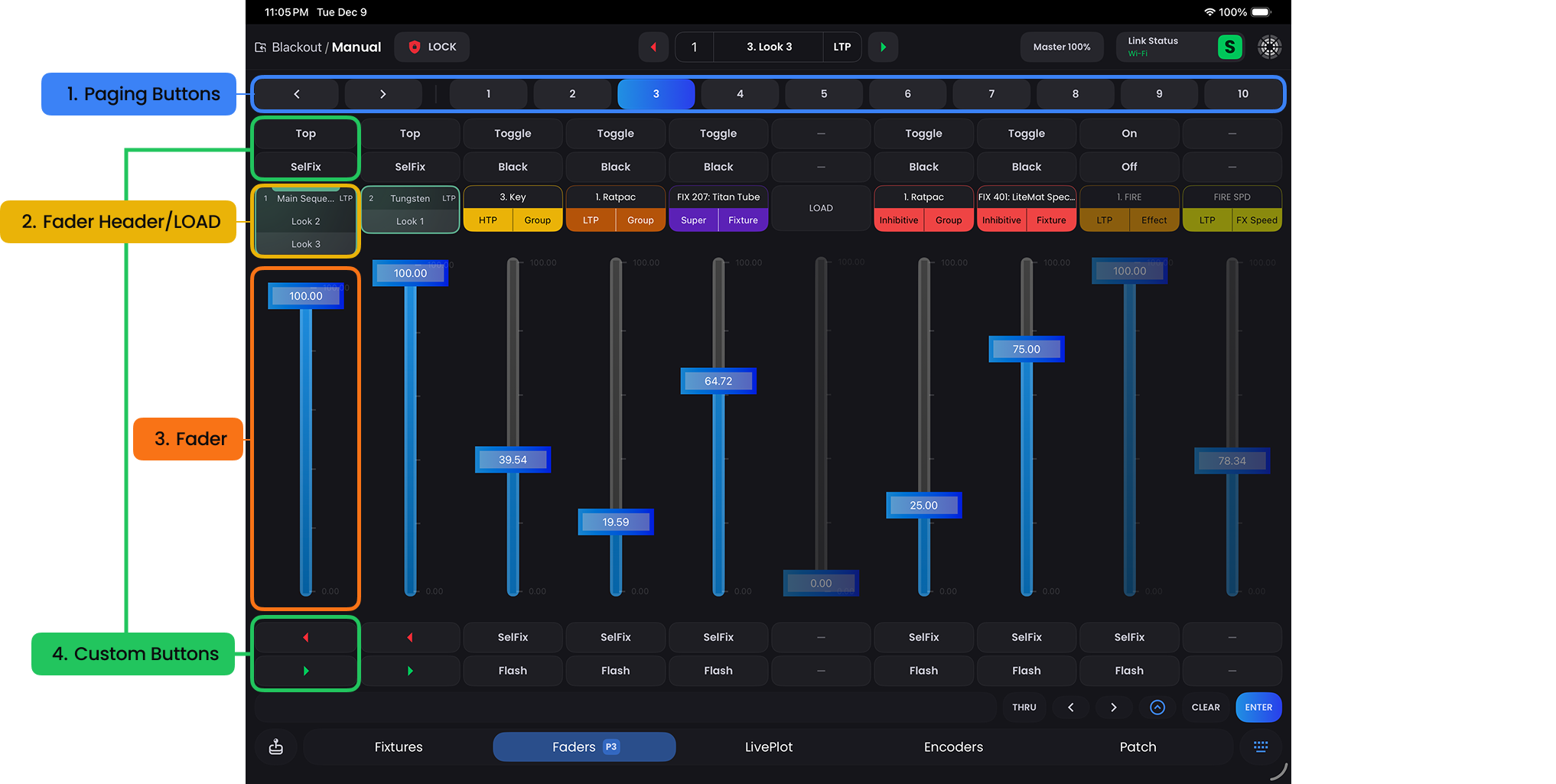
Paging Buttons
- Use the left and right arrows to navigate one page at a time or tap the number of the page you want to go to to jump to a specific page.
Fader Header or LOAD Button
- This is the Fader's header, or a place where you will see what is contained within the Fader.
- Long-press the header to modify the Fader's configuration and assign button types.
- Double-tapping the header will function as an ON/OFF button.
- This is the Fader's header, or a place where you will see what is contained within the Fader.
Fader
- Bringing the Fader to the top will transition all relevant Fixtures to their stored values within this Fader depending on the priority of the fader.
Custom Buttons
- These buttons are customizable via the
LOADbutton and give you a way to play with the fader in different ways.
- These buttons are customizable via the