
DMX Input
DMX Input allows Blackout to receive and visualize DMX data from external consoles or media servers using Art-Net or sACN protocols.
What is DMX Input Used For?
DMX Input is perfect for:
- Visualization - Give DPs, Gaffers, DITs, or anyone on set a visual representation of fixture states when they can't remember fixture numbers
- Console Collaboration - Work alongside programmers using other consoles (MA, EOS, HOG, Chamsys, ONYX) while visualizing their output in real-time
- Media Server Integration - Integrate with media servers like MadMapper for pixel mapping workflows, merging media content with traditional lighting control
- Converting a Showfile - Capture lighting states/presets/cues from incoming DMX data and save them in Blackout
- Documentation & Backup - Archive lighting cues from external consoles for reference or transfer programming between platforms
DMX Input Configuration
The DMX Input interface allows you to configure how incoming DMX data is routed and merged with Blackout's output. Each row in the routing table represents a mapping configuration:
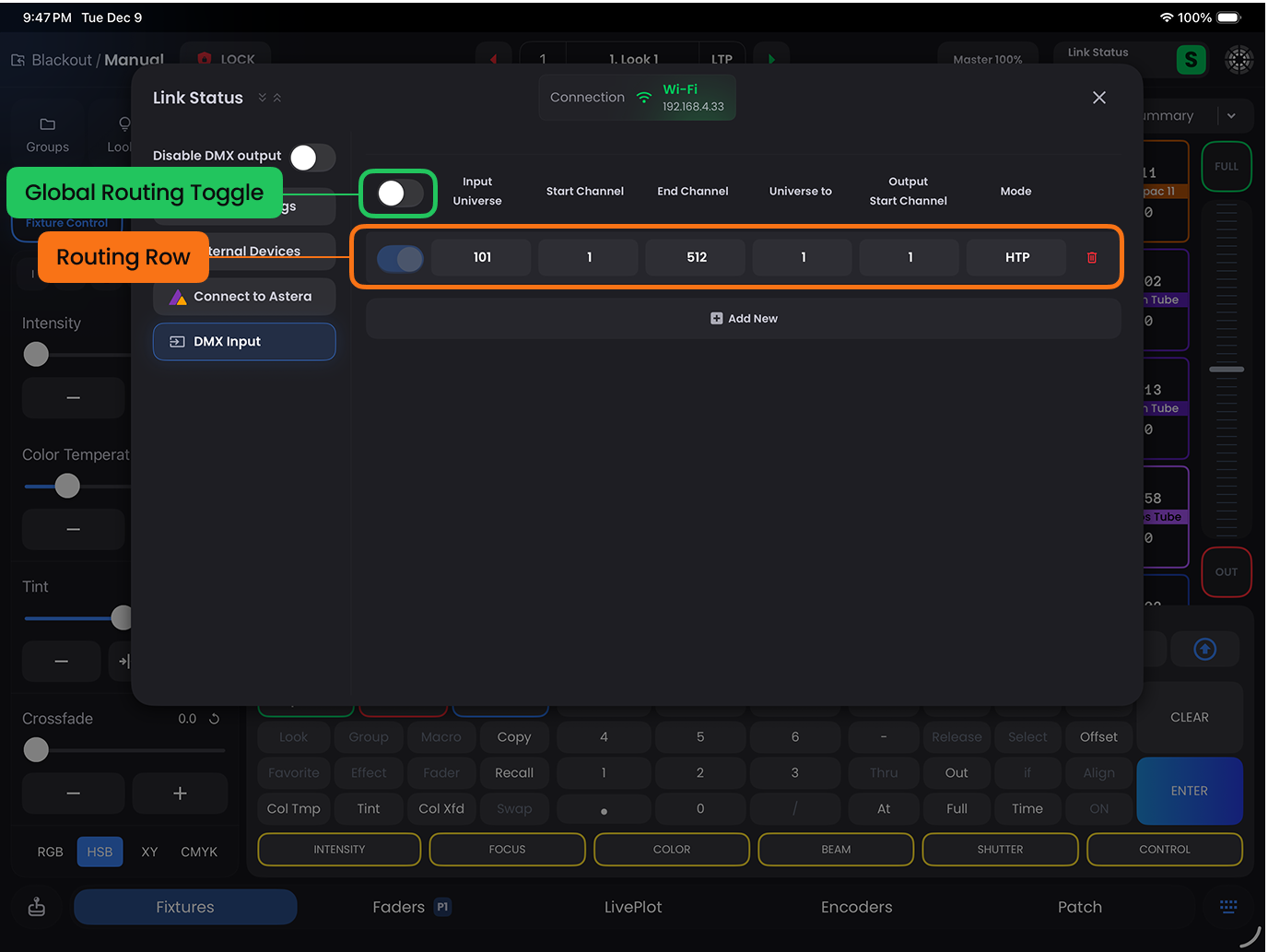
Routing Table Columns
- Input Universe - The incoming universe number from the external console or media server
- Start Channel - The starting DMX channel (1-512) from the input universe to begin reading
- End Channel - The ending DMX channel (1-512) from the input universe to stop reading
- Universe To - The destination universe in Blackout where the input data will be routed
- Output Start Channel - The starting DMX channel in the destination universe where the input data will be written
- Mode - How the input data is merged with Blackout's output:
- HTP (Highest Takes Precedence) - The highest value between input and output is used for each channel
- Override - Input data completely replaces Blackout's output for the specified channels
TIP
For simple 1:1 routing where the incoming DMX data is on the same universe(s) as your patch, you don't need to configure anything on this page. Simply switch view states in Fixtures or Live Plot to visualize incoming DMX data. This is the most common configuration when visualizing another console.
WARNING
Don't forget to disable DMX Output if using Blackout purely as a visualizer for another console.